
A slow website does not just test patience. It quietly loses visitors, leads, sales, and trust before your content even appears on the screen.
In 2026, website speed is a direct business factor. Users expect pages to open almost instantly, especially on mobile. If a page takes longer than three seconds to load, many visitors leave before they read, click, book, or buy. That is why the 3-second rule has become a strong benchmark for web performance, SEO, conversions, and user experience.
For businesses that rely on traffic, leads, bookings, or online sales, fast loading is not only a technical improvement. It is part of a strong digital growth strategy.
What Is the 3-Second Rule?
The 3-second rule means a website should load within three seconds or less. If it takes longer, users are more likely to leave and visit a competitor instead.
Online users have become used to fast apps, quick search results, and instant access to information. Because of that, a slow website feels outdated and unreliable. Even when the product or service is good, poor speed can create a bad first impression.
For mobile users, this matters even more. Many visitors browse on mobile data, weaker connections, or older devices. If your site is heavy, slow, or full of unnecessary scripts, users may leave before taking any action.
Why Load Time Matters for Website Success?
Load time affects almost every part of website performance. A fast website gives users a smoother experience, while a slow website creates frustration.
When pages load quickly, visitors are more likely to stay, read, scroll, click, and buy. This improves engagement and gives search engines better user signals. On the other hand, slow pages can hurt bounce rate, session time, conversions, and organic visibility.
For e-commerce websites, service businesses, blogs, and lead generation pages, speed can directly affect revenue. A one-second delay may sound small, but across thousands of visitors, it can mean lost sales, fewer inquiries, and lower trust.
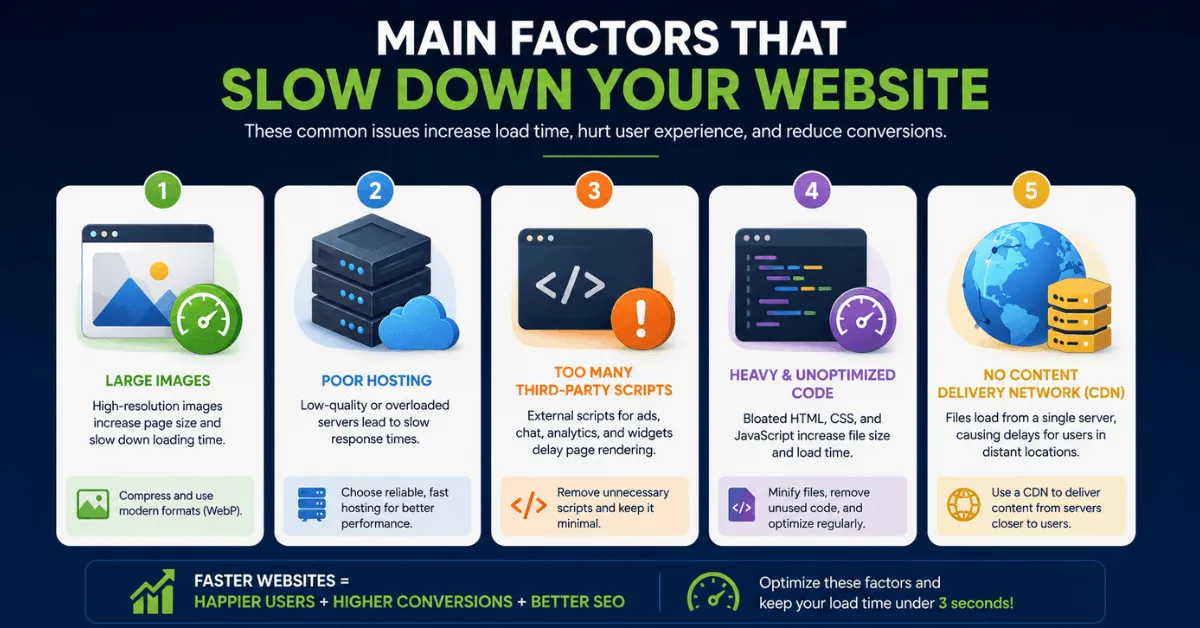
Main Factors That Slow Down a Website
Several issues can slow down a website. Some are technical, while others come from poor content or design choices.
Large Images
Large image files are one of the most common reasons websites load slowly. High-resolution images look good, but if they are not compressed properly, they can add unnecessary weight to the page.
Using modern formats like WebP, resizing images before upload, and compressing files can help reduce load time without damaging visual quality.
Poor Hosting
Cheap or overloaded hosting can make a website slow, even when the website itself is well-designed. Shared hosting may work for small websites, but growing websites often need better server resources.
A reliable hosting provider can improve response time, uptime, and overall page speed.
Too Many Third-Party Scripts
Tracking codes, ads, chat widgets, popups, analytics tools, and social media scripts can all slow down a page. Some are useful, but too many can delay loading and affect the user experience.
Website owners should review their scripts regularly and remove anything that is not needed.
Heavy Code
Messy HTML, unused CSS, large JavaScript files, and poorly structured themes can also increase load time. Clean code helps browsers load and display pages faster.
Minifying CSS and JavaScript, removing unused code, and using lightweight themes can improve performance.
No CDN
A Content Delivery Network, or CDN, helps deliver website files from servers closer to the user. This can reduce loading time for visitors in different countries or regions.
For websites with international traffic, a CDN can make a clear difference.
Best Tools to Measure Website Speed
Before improving speed, you need to measure where the problems are. These tools can help identify slow elements and performance issues.
Google PageSpeed Insights
Google PageSpeed Insights gives performance scores for both mobile and desktop. It also shows Core Web Vitals data and gives suggestions for improving load speed.
GTmetrix
GTmetrix provides detailed speed reports, loading time data, and waterfall charts. It helps show which files or scripts are slowing down the website.
WebPageTest
WebPageTest allows website owners to test speed from different locations, browsers, and connection types. This is useful for checking real-world performance.
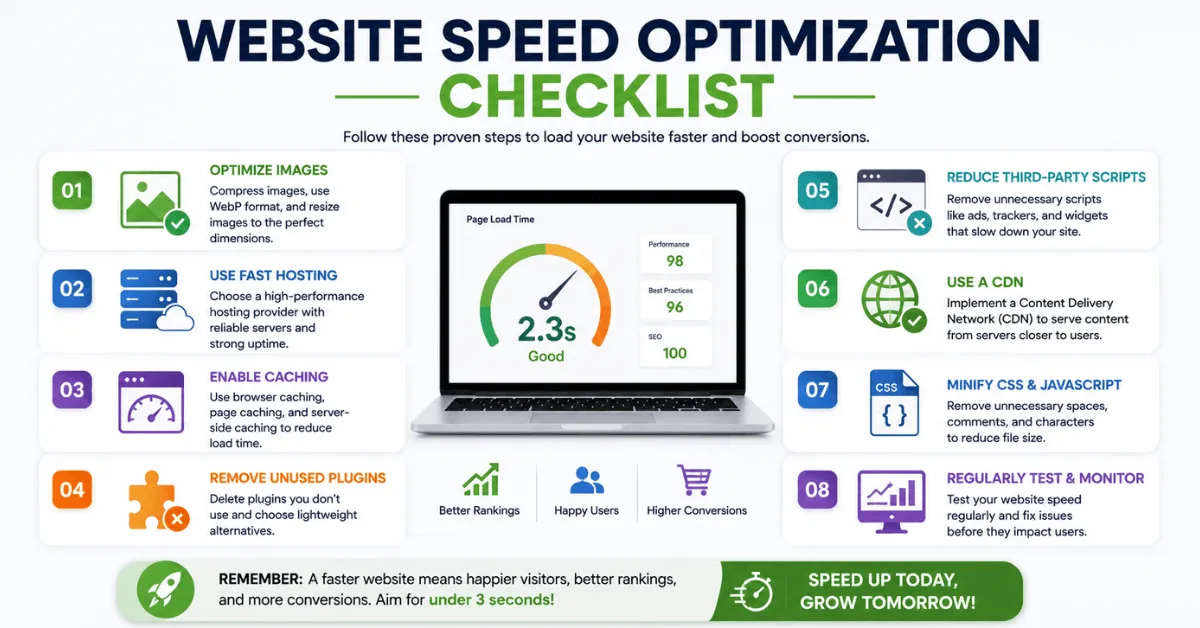
How to Speed Up Your Website?
Improving website speed does not always require a full redesign. Many websites can become faster by fixing common issues.
Compress and Resize Images
Before uploading images, resize them to the correct display size. Avoid uploading huge images when the page only needs a smaller version.
Use WebP where possible and compress files with trusted image optimization tools.
Use a Fast Hosting Provider
Hosting has a major effect on page speed. Choose hosting that offers strong server performance, good uptime, and fast response times.
For WordPress sites, managed hosting can often provide better results than low-cost shared hosting.
Enable Caching
Caching stores parts of your website so they do not need to load from scratch every time someone visits. This can make repeat visits much faster.
Browser caching, page caching, and server-side caching can all improve performance.
Remove Unused Plugins
Too many plugins can slow down WordPress websites. Remove plugins that are not being used, and replace heavy plugins with lighter alternatives where possible.
Reduce Third-Party Scripts
Check every script on your website. If a script does not support conversions, tracking, or user experience, remove it.
This includes unnecessary chat tools, popup scripts, tracking pixels, and old marketing tags.
Use a CDN
A CDN can help users load your website faster by serving files from nearby locations. This is especially helpful for websites with visitors from multiple countries.
Clean Up CSS and JavaScript
Minify CSS and JavaScript files. Remove unused code where possible. This helps browsers process your website faster.
How Fast Websites Improve User Engagement?
Fast websites create a better user experience. When visitors can open pages quickly, they are more likely to stay and interact with the content.
Speed also makes a website feel more professional. A smooth experience can increase trust, especially when users are comparing several brands or products.
Fast websites usually benefit from:
- Better user satisfaction
Visitors can access content without frustration. - Lower bounce rate
Users are less likely to leave before the page loads. - More page views
People are more likely to visit other pages when browsing feels smooth. - Higher interaction rates
Users are more likely to click buttons, fill forms, read articles, or complete purchases.
How Website Speed Affects Sales?
Website speed has a direct connection with sales. When a site loads slowly, users may abandon the buying process before viewing the product, adding it to the cart, or completing checkout.
For online stores, slow speed can damage revenue at every stage of the buyer journey.
For example, if an online store receives 10,000 monthly visitors and its product pages take too long to load, even a small increase in bounce rate can lead to hundreds of lost product views. If those missed visitors include ready-to-buy customers, the loss is not only traffic. It becomes lost revenue, weaker ad performance, and fewer repeat customers.
A slow homepage can lose new visitors. A slow product page can reduce interest. A slow checkout page can cause cart abandonment.
Speed also affects trust. If a website feels slow or unstable, users may question whether the business is professional or safe to buy from.
A faster website can support:
- More completed purchases
- Higher lead form submissions
- Better mobile conversions
- Stronger user trust
- Lower cart abandonment
- Better SEO performance
Speed Optimization Success Examples
Many businesses have improved conversions by reducing load time. While every website is different, the pattern is clear: faster pages often lead to better results.
An online store that reduced load time from five seconds to under three seconds may see more mobile users complete purchases. A service website using a CDN may reduce bounce rate because pages open faster for visitors in different locations. A travel website that compresses images may get more booking inquiries because users can browse packages without delay.
These examples show why speed should not be treated as a one-time fix. It should be part of regular website maintenance, especially for brands building long-term B2B authority and creative-led growth.
Final Thoughts
The 3-second rule matters because users expect fast websites. In 2026, slow loading can hurt conversions, SEO, trust, and revenue.
Website owners should focus on image optimization, better hosting, caching, CDN use, fewer scripts, and cleaner code. Even small improvements can lead to better engagement and more conversions.
A fast website helps visitors move from interest to action. For any business that depends on online traffic, speed is now a core part of growth.